Most trading journals track what happened. This one helps you understand why.
A structured Google Sheets trading journal and review system designed to help you spot the patterns hiding in your own trade data.
One payment. Duplicate and start once you've made your copy. Planned 7-day refund policy.
You're journaling. But are you actually learning?
Most traders know they should keep a journal. And most traders try — a spreadsheet here, a Notion template there, a notebook with scribbled entries.
But here's what usually happens:
- The journal becomes a collection of entries you rarely revisit.
- You log what happened, but don't have a structured way to ask why it happened.
- After a difficult stretch, you have no consistent method for reviewing what went wrong.
- Your “review process” is scrolling through past trades and feeling frustrated.
The problem isn't that you don't journal.
The problem is that your journal doesn't help you review.
A trade log records. A review system reveals.
From “what happened” to “what to examine”
The Trader's Review System is not just another trade log. It's a complete review workflow built directly into Google Sheets — the platform you already know and trust.
At its core is a simple idea: every trade you take contains information about your own decision-making process. But you can only access that information if you have a system for looking.
This template gives you that system.
Here's the workflow:
Before your session
Spend 2 minutes filling out a pre-session plan. What's your bias? Where are key levels? What rules are you committing to?
During your session
Log each trade in the Trade Log. Minimal required fields. You're trading, not doing data entry.
After your session
Spend 3 minutes on a guided post-session review. Did you follow your plan? What was your biggest mistake? Your best decision?
At the end of the week and month
Step back and look at the patterns. Which setup labels appear most often in your log? Which mistake categories keep recurring? Where might a closer look at your own data be worthwhile?
The result: You don't just know your win rate. You know what your own trade data is telling you — and what deserves a closer look.
Everything inside the template
7 fully structured tabs — ready to use
| Tab | What It Does |
|---|---|
| 📋 README & Instructions | Quick-start guide. Set up quickly and start with your first entry once you've made your copy. |
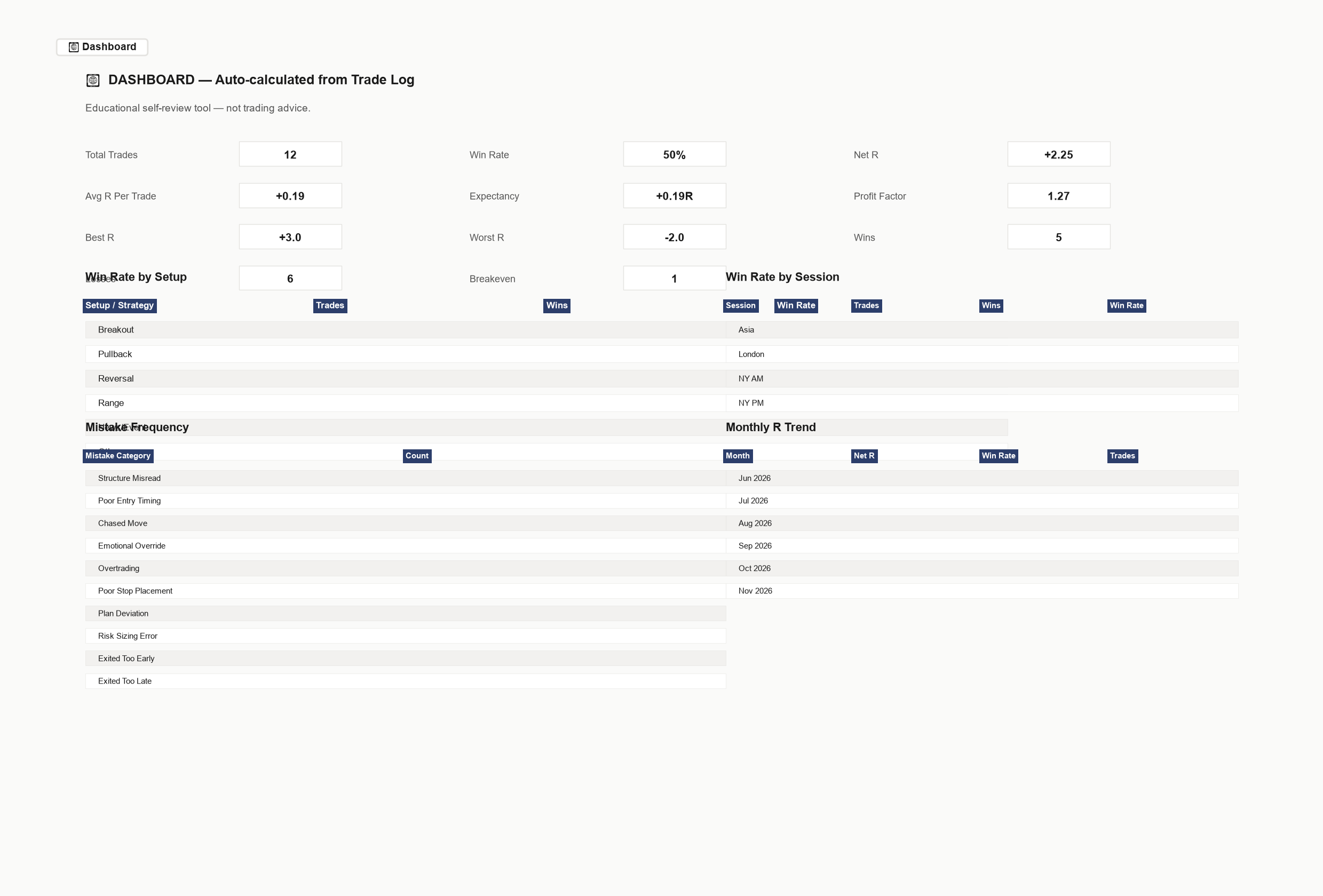
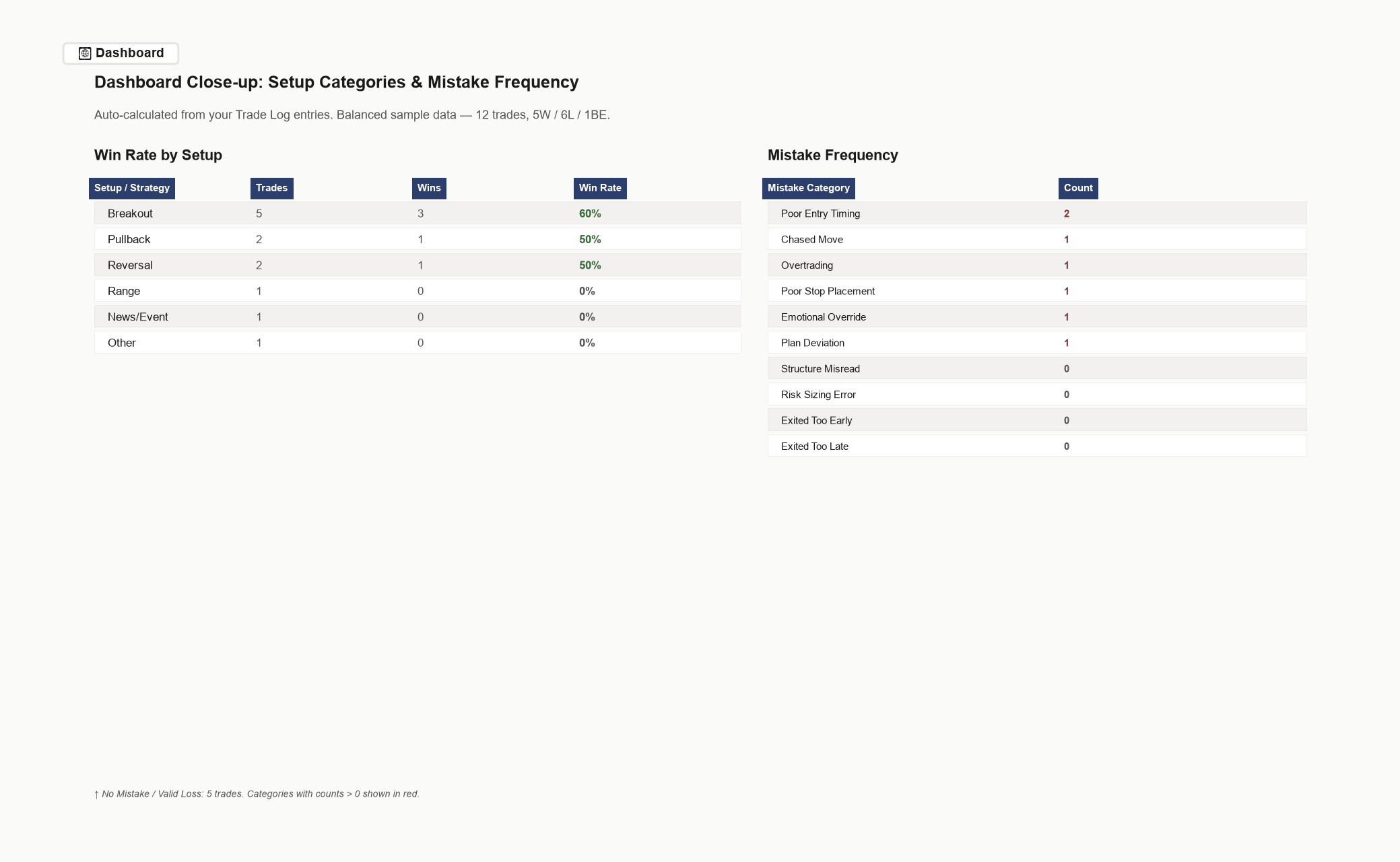
| 📊 Dashboard | Auto-calculated overview from your Trade Log entries. Win rate, expectancy, profit factor, avg R per trade, observed results grouped by setup category, results grouped by session, mistake frequency. All computed from data you enter. |
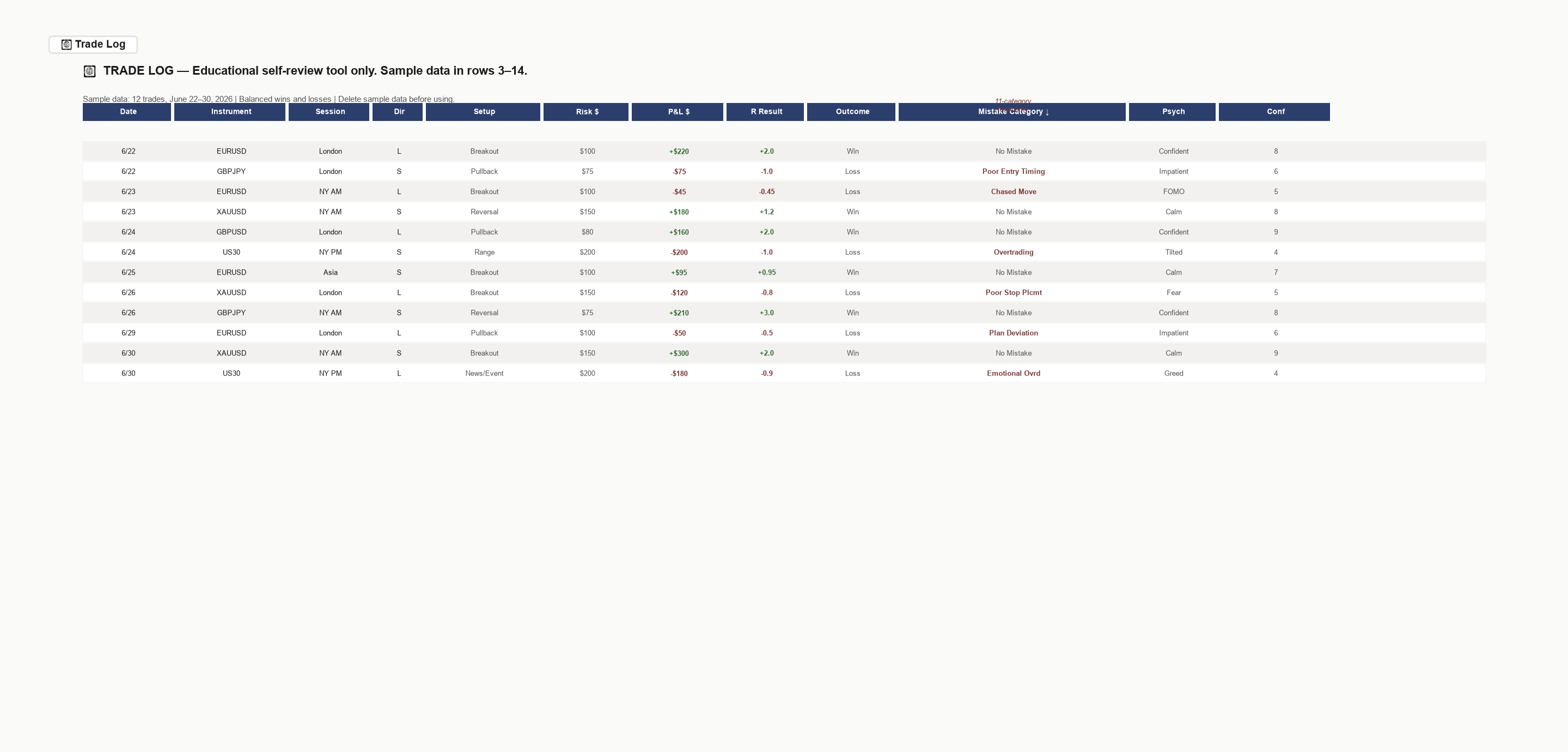
| 📝 Trade Log | The core. Log each trade with structured fields. 14 columns including risk (R), P&L, R-result, outcome, mistake category, psychology tag, confidence rating. Dropdowns keep entry consistent. Formulas auto-calculate R-result and outcome. Pre-filled for 500 trade slots. |
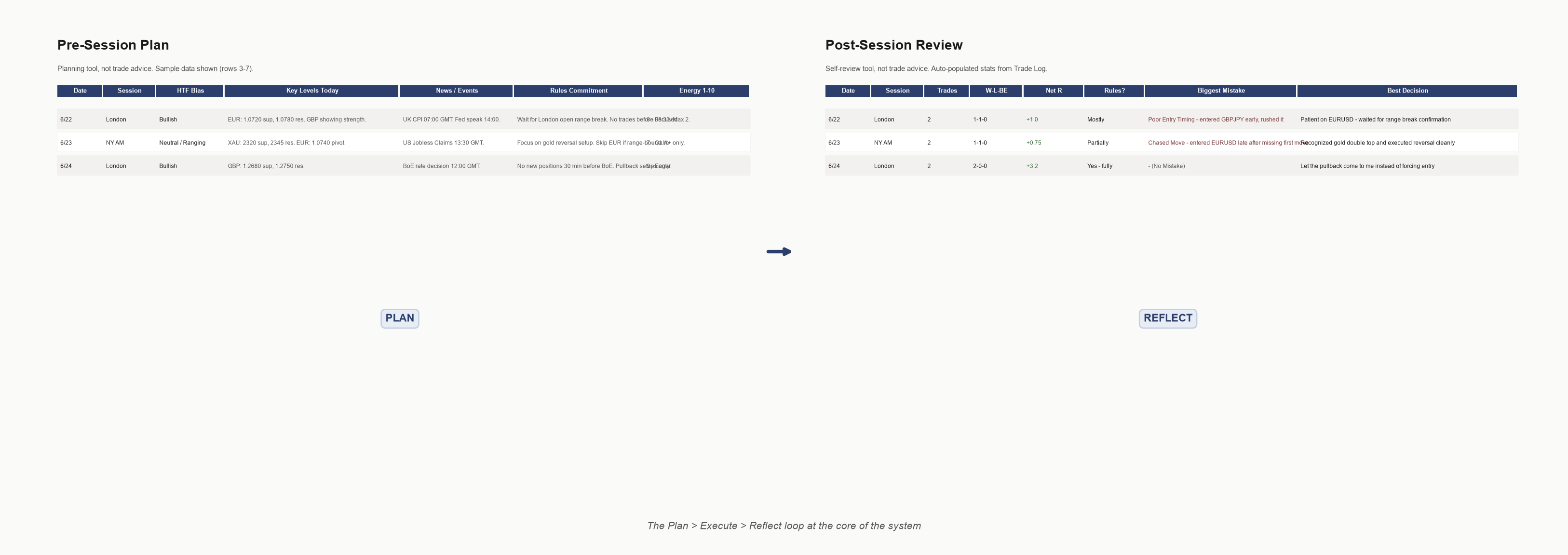
| 🌅 Pre-Session Plan | Guided preparation before each trading session. Higher timeframe bias, key levels, news events, rules commitment. Two minutes of clarity before you begin. |
| 🌇 Post-Session Review | Guided reflection after each session. Trades taken, rules followed, biggest mistake, best decision, psychology notes. Auto-pulls your session stats from the Trade Log. |
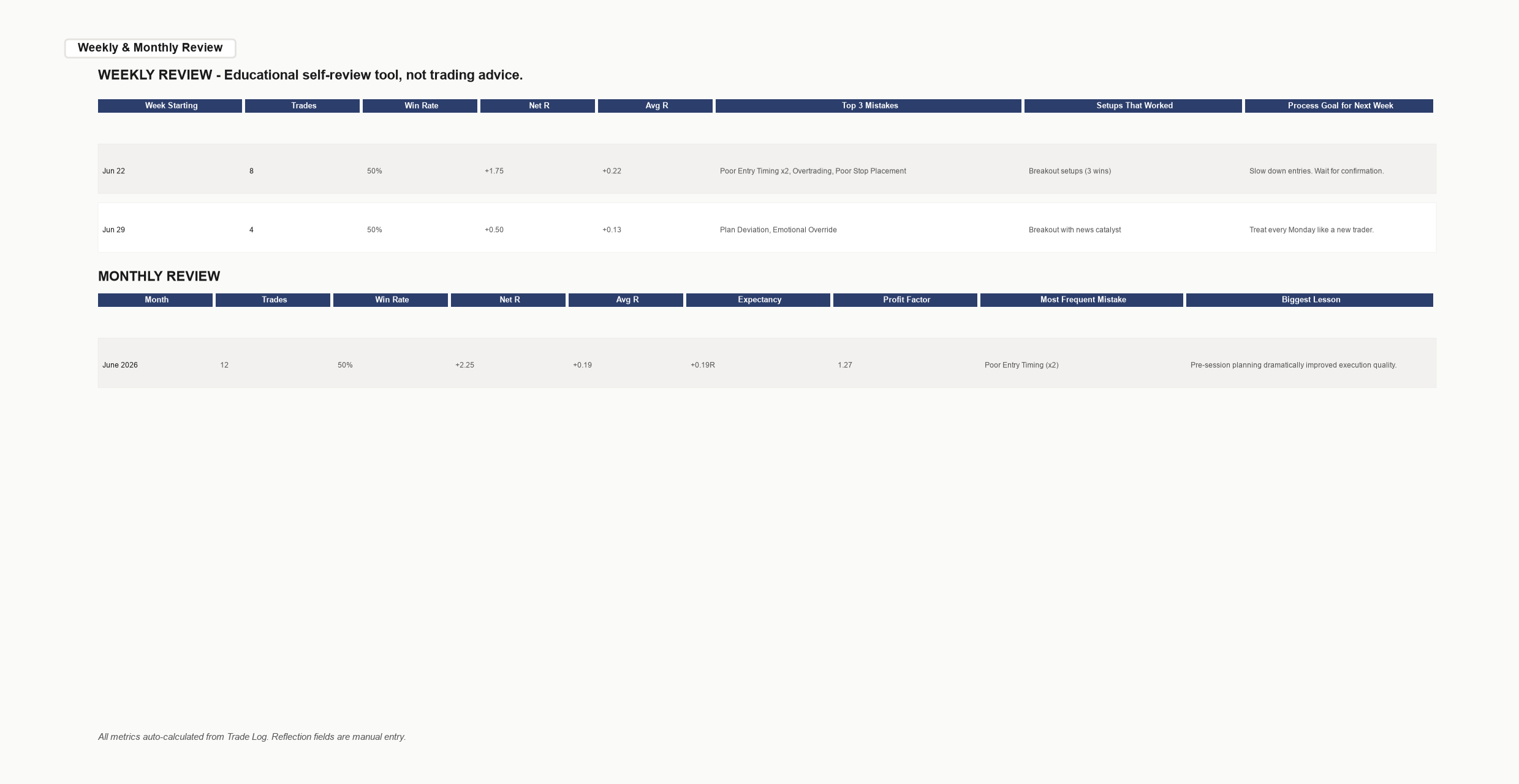
| 📅 Weekly & Monthly Review | Step back and look for patterns across time. Review how different setup labels appear across your completed trades. Which mistake categories recur? What does your psychology tracking show across sessions? |
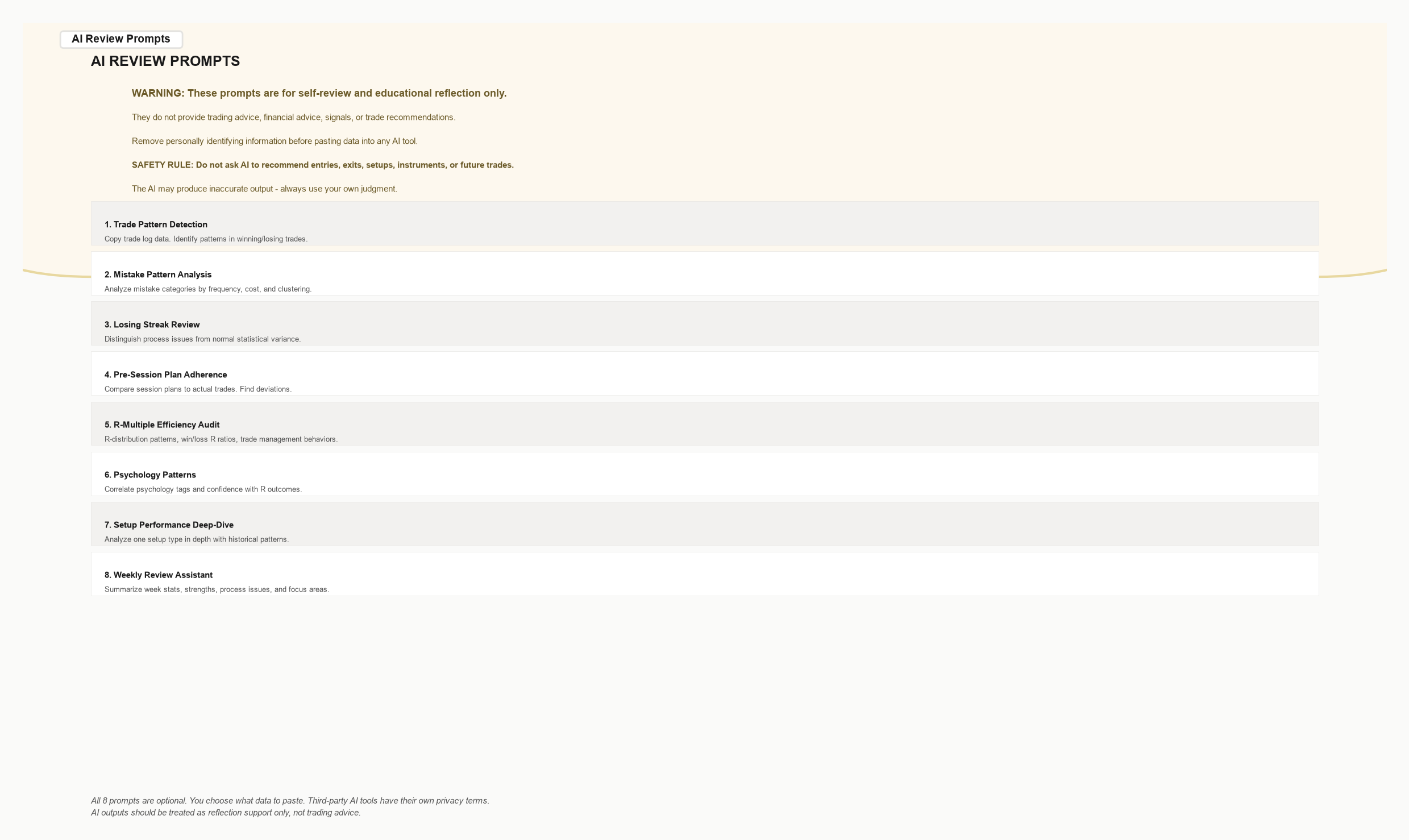
| 🤖 AI Review Prompts | 8 optional copy-paste prompt templates for ChatGPT, Claude, or Gemini. Designed for self-reflection on your own trade data. Strictly framed — prompts instruct the AI not to provide trading advice. |
Three steps from purchase to your first review
Duplicate
After purchase, you get a link to the Google Sheets template. Click “Make a copy.” That's it. The file is yours — private, editable, permanent.
Log
Open the Trade Log tab. Enter your first trade. Date, instrument, direction, risk, P&L, setup type. Dropdowns keep it fast. Optional fields let you go deeper when you want to.
Review
The heart of the system. After your session, open the Post-Session Review tab. Your trade stats auto-populate. Answer a few reflection questions. At the end of the week, the Weekly Review tab shows you what patterns emerge from your own data.
That's the loop. Log → Review → Refine. Repeat.
Who It's For / Who It's Not For
✓ This is for you if:
- You are a retail forex or futures trader (indices, commodities, crypto also compatible)
- You have some trading experience — you know the basics, understand terminology like “R-multiple” and “pullback,” and have taken real trades
- You already journal in some form but feel your current system isn't giving you the clarity you want
- You want a structured review process without paying $30–$80/month for SaaS journaling software
- You are comfortable with basic Google Sheets (typing into cells, selecting from dropdowns)
- You value process awareness over profit-chasing
- You want a manual review system for trades you have already taken
- You want to examine your own trading patterns more systematically
— Probably not right if:
- You've never placed a trade and don't understand basic trading terminology
- You're an institutional trader with compliance-mandated journaling software
- You want automated broker-sync import (this is a manual-entry template)
- You want a mobile-first native app experience (Sheets works on mobile but isn't a dedicated app)
- You're looking for trade signals, market predictions, or strategy recommendations
- You expect a SaaS product with ongoing feature development — this is a template, not a subscription service
- You're unwilling to spend ~2 minutes per trade on manual entry
Own it. No recurring charges.
There are plenty of good SaaS trading journals out there. They charge $30–$80 per month. For some traders, they're worth it.
This isn't that.
No subscription
Pay once. The file is yours.
No account required
You don't create a login. Your data lives in your Google account.
No vendor lock-in
Export to Excel anytime. Your trade history is rows in a spreadsheet, not rows in someone else's database.
No feature bloat
No dashboards you'll never use. No upsells. Just the tabs you need.
Accessible anywhere
Desktop, laptop, phone, tablet. The Google Sheets app works everywhere.
Your data stays yours
No backend, macros, scripts, or external connections. Your data lives in your own Google account.
See inside the template
Sample data from 12 trades, June 22–30, 2026 — balanced wins and losses. No cherry-picking.
Simple pricing. One payment.
- The complete 7-tab Google Sheets template
- Template updates included when released, where applicable
- Google Sheets (.gsheet link to duplicate) — also provided in .xlsx format
- Planned 7-day refund policy, subject to final checkout setup
Frequently Asked Questions
Important: The AI prompts are optional. If you use them, you choose what data to paste into third-party tools such as ChatGPT, Claude, or Gemini. Those tools are separate services with their own privacy terms. Do not paste sensitive information you do not want processed by a third party. AI outputs should be treated as reflection support only, not trading advice.
This product is an educational and self-review tool. It does not provide trading advice, financial advice, investment recommendations, signals, market predictions, or profit guarantees. Trading involves substantial risk of loss and is not suitable for all investors. Past performance does not indicate future results. The templates, frameworks, and review prompts in this product are for journaling and self-reflection purposes only. Your trading decisions and outcomes are entirely your own responsibility. Use at your own risk.
Ready to stop logging and start reviewing?
Most trading journals collect data. This one helps you examine it.
One payment. No subscription. A structured system that turns your trade history into something you can actually reflect on.
Planned 7-day refund policy. Template updates included when released, where applicable. Duplicate and start once you've made your copy.